

Microsoft Flight Simulator 2024 is available on PC, Xbox Series X|S, and PS5/PS5 Pro, offering the same core simulation experience across platforms. All versions receive updates simultaneously, ensuring feature parity and a consistent user experience.
PC Version
Playing Microsoft Flight Simulator 2024 (MSFS 2024 for short) on a PC gives you a lot of flexibility, particularly if you want to customize your experience with external products. Here are some reasons you may want to play on PC:
- More Hardware Options: PC allows for a wider variety of peripherals, including advanced flight sticks, rudder pedals, and multi-monitor setups. See our sections “Choosing your Hardware Setup” and “Beginner’s Guide to Peripherals” for more information.
- Higher Graphical Potential: Depending on your hardware, PC users can achieve higher frame rates and resolutions with the right settings.
- Virtual Reality Option: Simmers can make use of a plethora of virtual reality products and experience aviation in a whole new way.
- Mods and Community Content: The PC version supports 3rd-party mods, add-ons, and custom aircraft from a variety of sources.
PC System Requirements
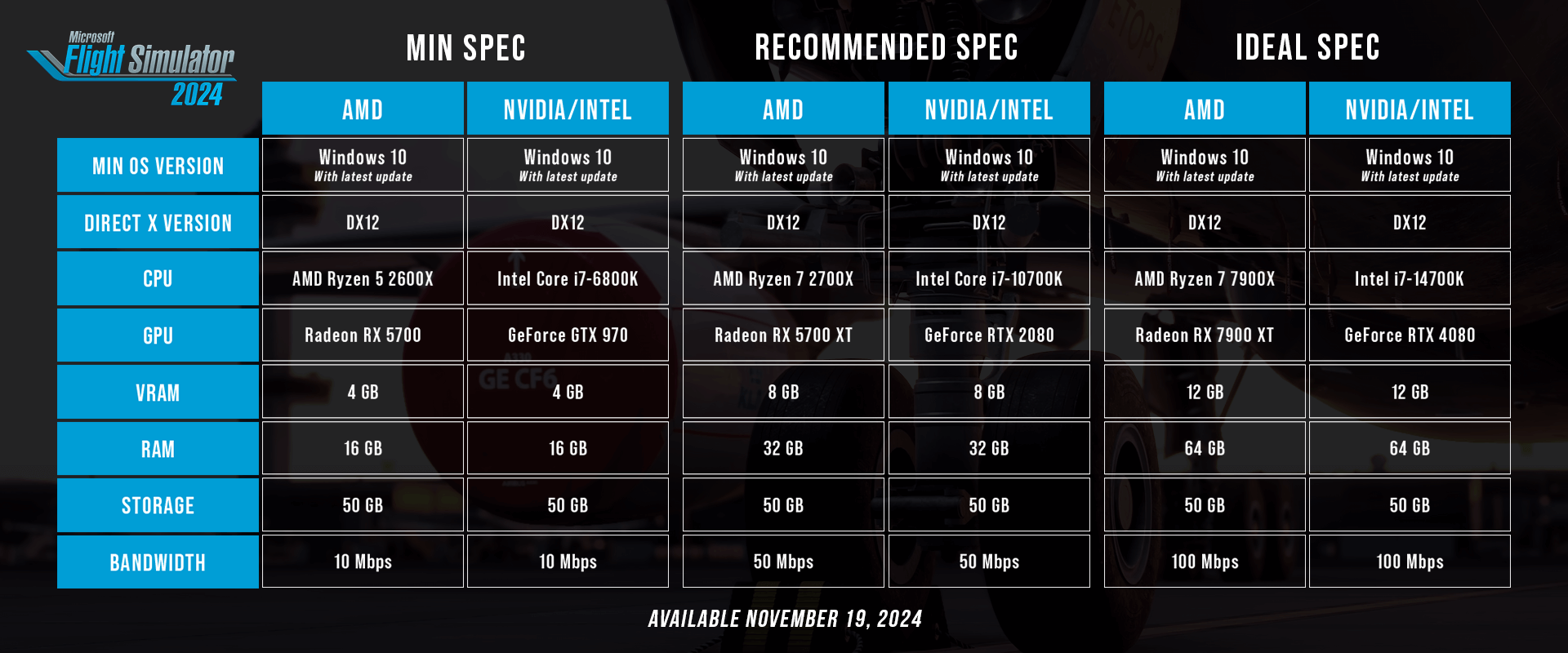
To run smoothly, here are the minimum, recommended, and ideal specs for MSFS 2024.
| Min Spec | Recommended Spec | Ideal Spec | |
| MIN OS VERSION | Windows 10 With Latest Update |
Windows 10 With Latest Update |
Windows 10 With Latest Update |
| DIRECT X VERSION | DX12 | DX12 | DX12 |
| CPU | AMD Ryzen 2600X or Intel Core i7-6800K | AMD Ryzen 7 2700X or Intel Core i7-10700K | AMD Ryzen 9 7900X or Intel it-14700K |
| GPU | Radeon RX 5700 or GeForce GTX 970 | Radeon RX 5700 XT or GeForce RTX 2080 | Radeon RX 7900 XT or GeForce RTX 4080 |
| VRAM | 4 GB | 8 GB | 12 GB |
| RAM | 16 GB | 32 GB | 64 GB |
| STORAGE | 50 GB | 50 GB | 50 GB |
Purchasing on PC: Microsoft Store vs. Steam
When purchasing Microsoft Flight Simulator on PC, you have two platform options: the Microsoft Store/Xbox App or Steam. While the core sim experience is the same regardless of where you buy it, there are important differences to consider.
Microsoft Store/Xbox App
If you purchase MSFS digitally through the Microsoft Store or Xbox App, your Microsoft Account will retain all in-sim purchases across both your PC and Xbox console. This means:
- If you decide to switch from PC to Xbox (or vice versa), you can seamlessly log in with your Microsoft Account and access your MSFS account and previously purchased add-ons.
- Cross-platform flexibility allows you to play on both PC and Xbox without repurchasing the simulator or Marketplace content.
Steam
If you purchase MSFS on Steam, you will be limited to playing only on PC. MSFS 2024 is not Steam Deck compatible at this time. Keep in mind:
- Your in-sim purchases from the Marketplace will not transfer if you switch to Xbox or PlayStation.
- If you ever decide to play on Xbox or PlayStation, you will need to repurchase the simulator and any desired add-ons separately.
Other than these differences, the core gameplay experience remains the same on both platforms. Your choice ultimately depends on whether you want cross-platform access (Microsoft Store/Xbox App) or prefer the Steam ecosystem (PC-only).
Installing Microsoft Flight Simulator
The installation process varies depending on where you purchased MSFS. If you need help, select the appropriate guide for your version:
Xbox Series X|S
If you prefer a lower cost of entry, Xbox Series X|S is a great way to enjoy Microsoft Flight Simulator 2024 without worrying about hardware upgrades or settings optimization and is a great plug-and-play experience. Here’s what you need to know:
- Ease of Use: No need to tweak graphics settings — just install and play. Runs smoothly on Xbox Series X|S with console-optimized settings.
- Works Great with a Gamepad: While flight sticks are supported, Xbox users can also play with a standard controller. See our sections “Choosing your Hardware Setup” and “Beginner’s Guide to Peripherals” for more information.
- You own it on both PC and Xbox: If you purchase the Xbox version, you automatically get the PC Version from the MS Store.
Xbox Cloud Gaming
Xbox Game Pass Ultimate members can play via Xbox Cloud Gaming, allowing access even on lower-end devices like tablets and mobile phones. Xbox Cloud Gaming also works on PC.
Xbox Game Pass
If you’d like to try MSFS 2024 without committing to a purchase, Xbox Game Pass (Premium or Ultimate Edition) is the most budget-friendly option. With Xbox Game Pass, you can play on either your PC or Xbox and switch between titles anytime.
- Xbox Game Pass offers a low monthly fee, giving you access to both MSFS titles along with hundreds of other games in Xbox’s roster.
- This may be the right choice if you want to try both sims before deciding on which one to buy.
- If you’re an Xbox Game Pass Ultimate or Premium user, you also get access to Cloud Gaming, allowing you to play on lower-spec PCs, Xbox Ones, etc.
Important Note: If you purchase add-ons from the Marketplace while using Xbox Game Pass, the products are tied to your account and depend on your Game Pass subscription. If MSFS ever leaves Game Pass, you’d need to buy the base game separately to access your add-ons again.
PS5 and PS5 Pro
For those who prefer gaming on PlayStation (PS5 and PS5 Pro), Microsoft Flight Simulator offers the same core simulation experience with console-optimized performance. Here’s what makes the PlayStation version unique:
- Fully Supports Key PS5 Features: Enjoy smooth performance with settings tailored for PlayStation hardware.
- DuelSense Enhanced: Fully playable with a standard DualSense controller utilizing haptic triggers, touchpad, gyro controls, and sound output.
- Crossplay Not Available: PlayStation users will connect only with others on PlayStation as there is no Microsoft account required.
- PSVR is coming in 2026 for Virtual Reality users.
Which One Should I Choose?
All three versions receive regular updates and support, ensuring an immersive and realistic flight simulation experience no matter which platform you choose.
- If you prioritize modding, hardware customization, and maximum graphical fidelity, you may choose PC.
- If you prefer a hassle-free, optimized, and console-friendly experience, Xbox or PlayStation are great choices.